
Thread 'Three ideas to push BitBOINC to the next level'
Questions and Answers : Getting started, support & suggestions : Three ideas to push BitBOINC to the next level
Message board moderation
✓ Solved
| Author | Message |
|---|---|
|
26 years old Send message Joined: 4 Oct 26 Posts: 10 Credit: 555,922 RAC: 2,723              
|
Hey Alperen, Since you are on a roll after you just implemented the GPU concurrent task scaling feature, I have three other quick feature ideas that could be huge for the project: 1. Add Snapdragon Adreno iGPU support (I have the hardware and can test/log everything for you). 2. Get BitBOINC onto the official BOINC Manager project list so people don't have to manually paste the URL. 3. Expand the account level view to show a full roadmap of all ranks and points instead of just the next level, so users can see the ultimate goal. |
|
25 years old  Send message Joined: 27 Sep 26 Posts: 418 Credit: 8,147,323 RAC: 241,882                       
|
I will fulfill your number one request; compiling it shouldn't be difficult. The BOINC app is not under our control; it is under the control of Dr. David Anderson. He also manages Science United, so I emailed him a few days ago and asked him to add us. The levels continue indefinitely, and an infinite number of autos are generated, so I cannot make a list for this. 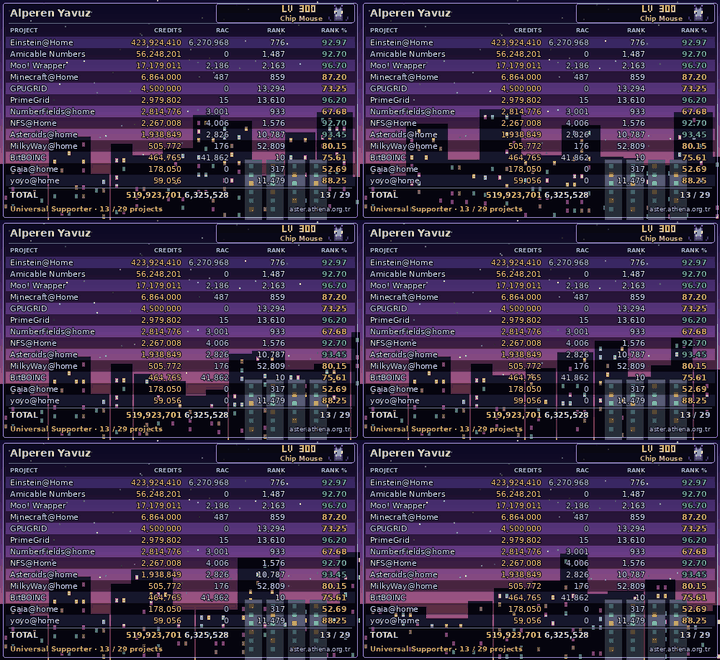
|
|
26 years old Send message Joined: 4 Oct 26 Posts: 10 Credit: 555,922 RAC: 2,723
|
That is legendary, thank you Alperen! Excited to test out the Snapdragon build whenever you're ready—just let me know what you need from my end. Makes total sense on the infinite levels, too. Keep up the phenomenal work! |
|
25 years old Send message Joined: 27 Sep 26 Posts: 418 Credit: 8,147,323 RAC: 241,882
|
If this processor of yours runs on Linux, it will be easier and faster. On Windows, I have to use a bunch of terrible libraries, so it will be slower.
|
|
25 years old Send message Joined: 27 Sep 26 Posts: 418 Credit: 8,147,323 RAC: 241,882
|
It has been done please test it and report the results.
|
|
26 years old Send message Joined: 4 Oct 26 Posts: 10 Credit: 555,922 RAC: 2,723
|
The Adreno iGPU support you mean? Well, still only Nvidia, AMD, Intel, and Apple showing up in projects settings, besides cpu only tasks, and not getting any Adreno iGPU tasks currently by selecting these 4 other GPU options. What do you want me to do now? :) |
|
25 years old Send message Joined: 27 Sep 26 Posts: 418 Credit: 8,147,323 RAC: 241,882
|
There is no suitable GPU definition for this. It doesn't have a direct definition in the BOINC system; no matter what I do, it seems unable to receive GPU tasks. You should try your luck on Linux, though there’s no guarantee there either.
|
|
25 years old Send message Joined: 27 Sep 26 Posts: 418 Credit: 8,147,323 RAC: 241,882
|
Lastly, I tried a different definition and I'll see if it works.
|
|
26 years old Send message Joined: 4 Oct 26 Posts: 10 Credit: 555,922 RAC: 2,723
|
Still not getting any iGPU tasks on my Adreno iGPU. But if you can't make it work, no big deal, then you should focus your time on more important things, just thought it might possibly be a low hanging fruit that could benefit the project :) |
|
25 years old Send message Joined: 27 Sep 26 Posts: 418 Credit: 8,147,323 RAC: 241,882
|
If you find out how PrimeGrid does this and let me know, this fix can be implemented.
|
|
26 years old Send message Joined: 4 Oct 26 Posts: 10 Credit: 555,922 RAC: 2,723
|
This long PrimeGrid thread, which I started, made Adreno iGPU possible on PrimeGrid: https://www.primegrid.com/forum_thread.php?id=14297 Summary below: The Problem When users run BOINC on Windows on ARM (like Snapdragon X devices), the scheduler initially pushes legacy 32-bit x86 binaries that fail immediately with SSE2 instruction set errors, or fall back to single-threaded emulation. Standard BOINC client-side GPU detection also fails for non-standard vendors like Qualcomm because BOINC historically hardcodes device detection for NVIDIA, AMD, Intel, and Apple. Step 1: Compiling Native ARM64 Binaries To get tasks running natively on Windows on ARM, the applications need to be compiled specifically for the architecture using MSYS2 and Clang: Toolchain: Use MSYS2-arm64 with make, gcc, and clang. BOINC Libraries: Build the BOINC static libraries (using the client release source, e.g., make -f Makefile.mingw adjusted for ARM paths). Application Build: Compile the project binary (such as Genefer) using clang for optimal performance. The compiler targets Neon, SVE-128, SVE-256, and SVE-512 instructions depending on what the specific ARM chip supports. Step 2: Bypassing Client-Side GPU Detection Limitations Because BOINC's standard device enumeration does not natively categorize Adreno iGPUs into the traditional vendor groups, direct scheduler assignment fails with a no applications error. To resolve this without rewriting core BOINC client code, a workaround using an app_info.xml file is deployed locally: The Anonymous Platform Trick: Declare a CPU application in app_info.xml but point the <file_ref> to the GPU-compiled binary (geneferg_arm.exe). Fallback Execution: When the binary runs, BOINC's boinc_get_opencl_ids() fails with a minor error (err = -31) because the Adreno chip is not in the traditional BOINC database. The binary then successfully falls back to select the default OpenCL device, perfectly utilizing the Adreno iGPU via OpenCL 3.0. Step 3: Server-Side Integration (Virtual Scheduling Groups) To implement official, native support on the project server without creating massive database fragmentation or hardcoding endless new hardware vendors: Virtual Groups: Similar to how Apple Silicon support is handled, the project admin creates a "virtual" scheduling group on the server to catch generic OpenCL devices (other_opencl) reported by the BOINC client. Unified Coproc Handling: In newer BOINC versions, unified OpenCL grouping (coproc_opencl) helps normalize the detection, allowing the virtual group approach to seamlessly handle the Qualcomm Adreno hardware alongside other non-traditional architectures. |


